
Joist Invoice & Estimate App
Joist Software Inc.Business
4.64.85K Reviews
- Version
- 3.82.1
- Installs
- 1.00M
- Age Rating
- Everyone
Screenshots
Our Review of Joist Invoice & Estimate App
 Analysis by Appyee
When I’m choosing a contractor invoicing app, I care about more than how quickly I can fill in a bill. I also want to know what happens when I’m standing at a job site with a client waiting, my signal is unreliable, or I need to pick up an unfinished task later. Joist Invoices for Contractors is built around estimates and invoices rather than general office work, and that focus makes it most useful when the paperwork itself is the bottleneck.
Joist is a free business app from Joist Software Inc. It has a 4.7 average from around 13,000 ratings, with more than a million installs, and its Everyone age rating makes it broadly suitable. The app has been available since April 14, 2014, and version 3.68.1 requires Android 8.0 or later. Some optional purchases are available, ranging from $7.99 to $309.99 per item, so I’d check what a particular paid option includes before building it into a business budget.
When a connection becomes part of the job
Joist’s most useful moments often involve sharing information: emailing a finished invoice, sending an estimate, or letting a client pay through an available payment option. Those steps depend on being able to communicate beyond the phone. That matters if you’re used to doing paperwork in a basement, a new-build interior, or another place where mobile reception can be patchy. I’d prepare the estimate details before a site visit when possible, then allow time to send or confirm the document once the connection is dependable.
That’s a practical distinction from a paper pad or a locally saved spreadsheet, where drafting can feel entirely separate from sending. Joist brings the document workflow together, but the handoff to a client is still a network-dependent moment. If a client is waiting for a price before deciding on a repair, I’d avoid promising instant delivery until I know the phone has a usable connection.
Built for quick checks on a phone
The app’s appeal is clearest when I’m moving between jobs rather than sitting at a desk. A contractor can enter labor and materials while the scope is fresh, look up saved client details, and keep an eye on unpaid invoices from the dashboard. That is more practical than trying to reconstruct a day’s work from notes after getting home. A tablet-to-phone handoff can also suit someone who prefers to draft at a larger screen and make a final check on the device they carry to appointments.
For a realistic example, imagine finishing a small repair and agreeing on a follow-up job before leaving the customer’s home. I could put together an estimate while the measurements and material choices are still in mind, review the taxable and non-taxable items, and send it once the connection allows. The benefit is not simply fewer taps: it reduces the chance that I forget a small line item after moving on to the next call. I would still take care to confirm quantities and tax treatment before sending, because a polished document can make an incorrect estimate look more final than intended.
What I’d do if sending is delayed
A weak connection can interrupt the part of the process that involves email or payment, so I’d treat a completed draft and a delivered document as two different checkpoints. Before leaving a customer, I’d verify that the estimate is actually sent rather than assuming that tapping a send control means it has reached the recipient. If delivery has to wait, a short verbal explanation and a clear plan to follow up later are better than leaving the customer unsure.
It also helps to keep the work in manageable stages: confirm the client record, check the line items, review the totals, and only then move to sending. This makes it easier to spot whether a delay is a connectivity issue or a detail that still needs attention. When I’m back on a reliable connection, I can revisit the document and complete the handoff instead of starting the estimate from memory. I wouldn’t use any invoicing app as the only record of a job; keeping appropriate business records elsewhere is a sensible safeguard.
Use data deliberately on the road
Estimates and invoices can contain client contact information, job descriptions, and prices, so I’d be thoughtful about where I open or share them. On a shared device, I’d sign out or secure access as appropriate, and I’d double-check the recipient before sending a document. Those habits are especially worthwhile when several customer records look similar or when I’m handling paperwork between appointments.
Joist’s cross-device syncing is convenient, but it also means I’d want to be deliberate about which device I use and when I make changes. If I edit a quote on one device and then switch to another, I’d check that I’m looking at the current version before sending it. That quick review can prevent an outdated price or scope from going to a customer. For a contractor who works alone, this is an easy routine; a small team may need a shared habit for who updates a quote and who sends the final version.
Where it fits among contractor tools
Compared with paper forms, Joist can make documents easier to read, reuse client details, and follow up on unpaid invoices without sorting through a folder. Compared with a general spreadsheet, its invoice-and-estimate focus is more approachable for someone who does not want to design templates or manually keep a payment status column current. The trade-off is that a spreadsheet can be adapted to unusual workflows, while Joist’s simpler structure is most comfortable when your jobs fit the fields and process it provides.
It is not a substitute for full accounting software. A bookkeeper or contractor who needs deeper bookkeeping and a broader view of business finances may be better served by a dedicated accounting system, with Joist used only if it fits alongside that workflow. Likewise, larger teams should think about how approvals, record ownership, and reporting need to work before relying on a mobile invoicing tool as their central system. I’d start by testing a typical estimate and invoice, then decide whether the app covers the parts of the process that currently consume the most time.
One useful habit is to build a consistent way of describing common work rather than rushing through each estimate from scratch. Clear item descriptions help customers understand what they are approving and make later comparisons easier. Another is to review an estimate from the client’s point of view: are labor, materials, and any discount easy to interpret, and does the total match the conversation? Those checks take little time but can prevent confusion that no payment reminder can fix.
Getting Started with Joist
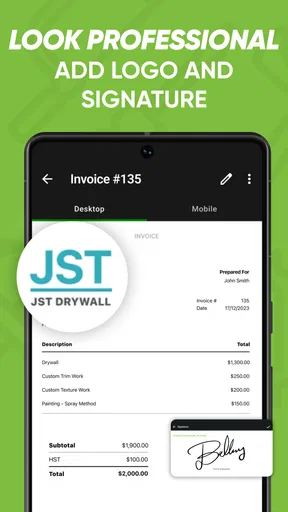
First off, downloading Joist Invoices for Contractors is a breeze. It’s free to get started, which is always a plus in my book. Once installed, the app guides you through setting up your business profile. You can add your company logo, contact details, and other custom info, which is perfect for keeping your brand consistent.
The user interface is super intuitive. You don't need to be a tech wizard to figure it out. Everything is neatly organized, and the app walks you through the process of creating your first invoice or estimate with simple prompts.
Creating Invoices and Estimates
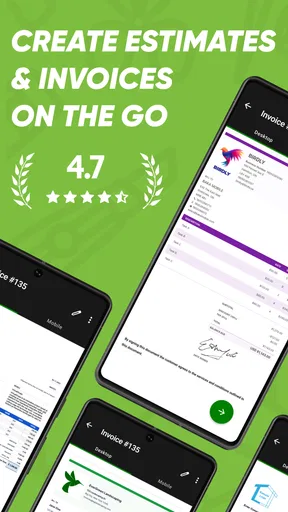
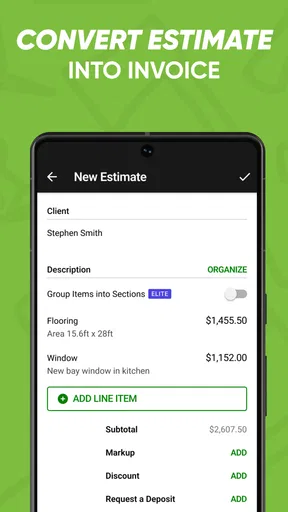
This is where Joist really shines. You can create professional-looking invoices and estimates in just a few taps. The app lets you include all the necessary details like labor costs, materials, and taxes. Plus, you can apply discounts or mark items as taxable or non-taxable with ease.
The ability to add client details and save them for future use is a time-saver. Once you've created an invoice, sending it is as simple as hitting "send" — the app emails it directly from your device. You can also print it or save it as a PDF. Talk about convenience!
Payment Tracking and Management
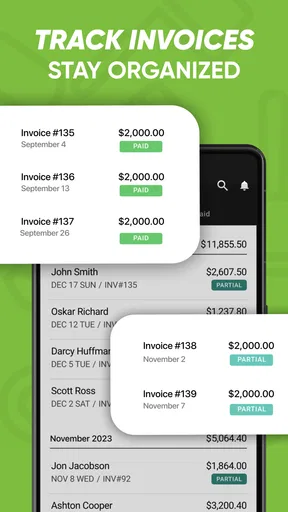
Keeping track of payments is a crucial part of managing your business, and Joist has got you covered. The app shows you which invoices are unpaid, overdue, or paid, right from the dashboard. You can even send reminders to clients with overdue payments, which is a gentle nudge to get them moving.
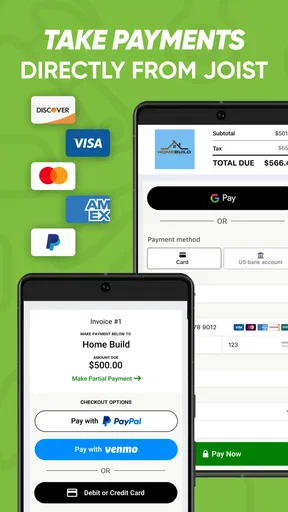
Joist also offers integration with payment platforms like PayPal, which means clients can pay directly through the invoice. It’s a small feature, but one that saves tons of time and hassle.
Additional Features
Joist isn’t just about invoices and estimates. It’s packed with extra features that contractors will find valuable. For instance, you can create a client database, track project costs, and even analyze your business performance using simple reports.
One feature I particularly like is the ability to sync data across multiple devices. This means you can start an estimate on your tablet and finish it on your phone, which is perfect for those constantly on the move.
Room for Improvement
No app is perfect, and Joist is no exception. While it offers a lot of functionality for free, some advanced features require a subscription. For small contractors, the free version might be enough, but larger businesses might find the premium options worth the investment.
I also noticed that while the app is great for creating invoices and estimates, it doesn’t offer full accounting functionalities. So, if you’re looking for an all-in-one accounting solution, Joist might fall a bit short.
Final Thoughts
All in all, Joist Invoices for Contractors is a nifty tool that simplifies a lot of the paperwork involved in contracting. It’s easy to use, packed with features, and can save you a ton of time. Whether you’re a solo contractor or managing a small team, Joist is definitely worth checking out.
If you’re tired of the old-school way of handling invoices and estimates, give Joist a try. You might find it’s exactly what you need to keep your business running smoothly without the hassle.
Verdict
Strengths of Joist Invoice & Estimate App
- User-friendly interface for easy navigation.
- Quick invoice creation saves time.
- Customizable templates enhance branding.
- Tracks payment status effectively.
- Offline access available for convenience.
Limitations of Joist Invoice & Estimate App
- Limited integrations with other apps.
- No multi-currency support.
- Basic reporting features only.
- Cloud sync requires premium plan.
- Occasional bugs in the Android version.
Similar Picks in This Category
View All
LinkedIn: Community & Network
LinkedIn3.8

Zoom Workplace
zoom.com4.1

Microsoft Teams
Microsoft Corporation4.6

Meta Business Suite
Meta Platforms, Inc.4.6

Webex Meetings
Cisco Systems, Inc.4.5

TeamViewer Remote Control
TeamViewer4.4
Frequently Asked Questions
What is Joist Invoices for Contractors?
Joist Invoices for Contractors is a mobile application designed to help contractors manage their invoicing and estimation processes efficiently. It enables users to create and send professional invoices, estimates, and manage client information on-the-go. Available for both Android and iOS, it streamlines administrative tasks, allowing contractors to focus more on their projects.
Is Joist Invoices for Contractors free to use?
Yes, Joist offers a free version with essential features for creating invoices and estimates. However, there is also a Pro version available for a subscription fee, which includes advanced features such as automated reminders, custom branding, and detailed reporting to enhance business management capabilities.
Can I customize my invoices and estimates in Joist?
Absolutely! Joist allows users to customize invoices and estimates by adding their company logo, selecting templates, and including detailed line items. This customization helps contractors maintain a professional appearance and tailor documents to meet specific client requirements, enhancing client communication and satisfaction.
How does Joist help with payment collection?
Joist simplifies payment collection by allowing contractors to accept credit card payments directly through the app. This feature speeds up the payment process, reduces delays, and provides clients with a convenient and secure method to pay invoices, ultimately improving cash flow for contractors.
Does Joist offer customer support for its users?
Yes, Joist provides customer support to assist users with any issues or questions. Support is available through various channels, including email and an extensive help center on their website. This ensures that users can resolve problems quickly and continue to use the app effectively.
